Skip to content
View in the app

A better way to browse. Learn more.

New Jersey Gun Forums

A full-screen app on your home screen with push notifications, badges and more.

To install this app on iOS and iPadOS
  1. Tap the Share icon in Safari
  2. Scroll the menu and tap Add to Home Screen.
  3. Tap Add in the top-right corner.
To install this app on Android
  1. Tap the 3-dot menu (⋮) in the top-right corner of the browser.
  2. Tap Add to Home screen or Install app.
  3. Confirm by tapping Install.

There's a GHOST in my HOUSE!!!

Featured Replies

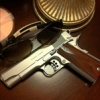
A 92FS Brigadier INOX "Ghost" that is... :mrgreen: :mrgreen: :mrgreen:


Snapped a few quick ones with the iPhone...

I don't know why this wouldn't be in anyone's collection or at the top of your wishlist. Absolutely phenomenal firearm. Goes BANG everytime. Looks the part. Accurate as all hell.


Modded with an Elite Skeletonized Hammer, Hogue wrap-around "Ghost" grips and a "D" hammer spring.


LOVE IT!

Will have to take some nicer pics at some point. The cleaning mat and CLP background really does not do this gun justice.. haha..


IMG_0448.jpg


IMG_0450.jpg

That is the best looking semi auto (HK P7 is a close second) around! Nice Alex, and good luck with her.

A 92fs is at the top of my list for next handgun purchase. That one sure is sexy.

  • Author
Does it have the polymer trigger? I have the same grips on my 92FS and a D-spring. Since I have the old metal trigger, I put in the INS trigger spring. Here is a link to the INS spring: http://www.gunsprings.com/Semi-Auto%20P ... mID2/dID36


My Brig also has a metal trigger. Does the INS spring make a big difference?

Was it difficult to install?

That is a spookingly :lol: nice pistol you got there. Best of luck with her!

Join the conversation

You can post now and register later. If you have an account, sign in now to post with your account.

Guest
Reply to this topic...

Recently Browsing 0

  • No registered users viewing this page.

Account

Navigation

Search

Search

Configure browser push notifications

Chrome (Android)
  1. Tap the lock icon next to the address bar.
  2. Tap Permissions → Notifications.
  3. Adjust your preference.
Chrome (Desktop)
  1. Click the padlock icon in the address bar.
  2. Select Site settings.
  3. Find Notifications and adjust your preference.